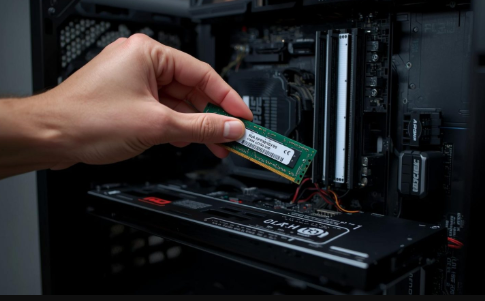
Upgrading your computer’s memory is one of the easiest and most cost-effective ways to improve overall system performance. Whether your PC feels slow, struggles with multitasking, or lags while running heavy applications, adding or replacing RAM can make a noticeable difference. Today, more users prefer to Buy RAM Online because it offers convenient access to a wide range of memory options, capacities, and compatibility choices without the need to visit a physical store. Online purchasing also makes it easier to compare specifications, prices, and availability, helping buyers make smarter upgrade decisions.
However, buying memory online requires the right knowledge. From choosing the correct type to ensuring system compatibility, making the wrong purchase can lead to wasted money and performance issues. This guide will walk you through everything you need to know to confidently purchase RAM online and upgrade your PC like a professional.
Understanding What RAM Does
Before buying, it is important to understand RAM’s role in system performance.
RAM, or Random Access Memory, acts as your computer’s short-term workspace. It temporarily stores active data so the processor can access it quickly. The more RAM your system has, the more tasks it can handle simultaneously.
Upgrading RAM helps with:
- Faster application loading
- Smoother multitasking
- Improved gaming performance
- Better editing and rendering speed
- Reduced system lag
Identify Your Upgrade Needs
Not every user requires the same amount or type of memory. Your usage determines what you should buy.
Basic users who browse the web and use office applications can function well with lower capacities. Professionals working with design tools, development environments, or virtual machines require significantly more.
Ask yourself:
- Do I multitask heavily?
- Do I edit video or photos?
- Do I run virtual machines?
- Do I play modern games?
Check System Compatibility First
One of the most common mistakes when people buy RAM online is ignoring compatibility.
Before purchasing, verify:
- Motherboard supported RAM type
- Maximum memory capacity
- Number of available slots
- Supported speed (MHz)
- Form factor (DIMM or SODIMM)
Desktop systems use DIMM modules, while laptops use SODIMM. Installing the wrong form factor will not work. You can check compatibility through your motherboard manual, system information tools, or manufacturer website.
See also: Distemper Paint Price for 20 Liters: A Complete Guide with Interior Paint Colors
Choosing the Right RAM Type
Modern systems primarily use DDR4 or DDR5 memory. Each generation offers different performance levels.
DDR4 remains widely used and is cost-effective for most users. DDR5 delivers higher bandwidth and efficiency, making it ideal for next-generation workloads. When upgrading, always match the RAM generation supported by your motherboard. Mixing generations is not possible.
Selecting the Right Capacity
Capacity determines how much data your system can handle at once.
General recommendations:
- 8GB for basic computing
- 16GB for multitasking and gaming
- 32GB for professional workloads
- 64GB+ for enterprise or virtualization
Buying slightly more than your current need helps future-proof your system. When customers Buy RAM Online from enterprise suppliers, they often choose scalable configurations to allow expansion later.
Understanding RAM Speed
Speed, measured in MHz, affects how quickly memory communicates with the CPU.
Higher speeds improve:
- Rendering timelines
- Game responsiveness
- File processing
- Software launch times
However, your motherboard must support the selected speed. Otherwise, RAM will run at a lower default frequency. Balancing speed and capacity ensures optimal performance without overspending.
Single vs Dual Channel Configuration
Memory performance also depends on how modules are installed. Single channel uses one RAM stick. Dual channel uses two identical sticks working together.
Dual channel provides:
- Better bandwidth
- Faster multitasking
- Improved gaming performance
- Higher system responsiveness
When upgrading, buying matched pairs often delivers better results than a single high-capacity module.
Buying New vs Refurbished RAM
Online marketplaces offer both new and refurbished memory. New RAM is unused and comes with full manufacturer warranty. Refurbished RAM is tested, verified, and more affordable.
Businesses and IT buyers often source refurbished enterprise memory from trusted suppliers like Ram Exchange, especially when upgrading servers or legacy systems cost-effectively. The key is ensuring the seller provides testing certification and warranty coverage.
Where to Buy RAM Online Safely
Choosing the right seller is just as important as choosing the right RAM.
Reliable online suppliers offer:
- Compatibility assistance
- Warranty protection
- Tested inventory
- Bulk purchase options
- Technical support
Professional hardware providers such as Ram Exchange specialize in supplying both modern and legacy memory solutions, making them a preferred source for individuals and enterprises alike.
Installation Tips to Upgrade Like a Pro
Before installing:
Once your RAM arrives, proper installation ensures maximum performance.
- Shut down your PC
- Unplug power supply
- Ground yourself to avoid static damage
Installation steps:
- Open the system case or laptop panel
- Locate RAM slots
- Align module notch correctly
- Press firmly until clips lock
- Close system and reboot
Most systems automatically detect new memory. You can verify through system settings or BIOS.
Post-Upgrade Performance Optimization
After upgrading, a few optimizations help maximize performance.
Recommended actions:
- Enable XMP or EXPO profiles in BIOS
- Update motherboard firmware
- Monitor memory usage
- Run stability tests
Common Mistakes to Avoid
Many buyers face issues due to simple oversights.
Avoid these mistakes:
- Buying incompatible RAM type
- Ignoring speed limitations
- Mixing different capacities improperly
- Purchasing from unverified sellers
- Skipping warranty coverage
Benefits of Upgrading RAM Instead of Replacing a PC
Many users assume they need a new computer when performance drops. In reality, memory upgrades often solve the problem at a fraction of the cost.
RAM upgrades provide:
- Immediate speed improvement
- Extended system lifespan
- Better multitasking
- Cost savings vs new hardware
- Increased productivity
Enterprises frequently extend infrastructure life cycles by upgrading memory through partners like Ram Exchange rather than replacing entire systems.
Conclusion
Buying memory online has made PC upgrades more accessible than ever, but making the right choice requires understanding compatibility, capacity, speed, and reliability. With the right planning, upgrading RAM can dramatically improve multitasking performance, system responsiveness, and overall computing efficiency.
Whether you are enhancing a personal workstation, gaming setup, or enterprise infrastructure, investing in the right memory ensures long-term performance gains. If you are ready to upgrade and want expert guidance on selecting the right configuration, Connect with us to discuss your upgrade requirements and available options.